Web Scraping: Part I
If we are about to get started on the subject, let’s get our objectives and technical terms straight. Web scraping (it’s a legitimate subject, by the way) simply means extracting content from a web page by looking at its HTML (more on that later). A couple of things are probably bugging you about this seemingly simple thing, right?
Why should I care?
And there is an equally simple answer for it too.
Machine learning is all about data, and it can sometimes be immensely helpful to gather data and create one’s own datasets for testing a model or adding data to it in general. But then, why write code when we can just copy and paste things? In fact, today’s example is simple enough to make you want to do that. Resist the temptation, though. It isn’t practical for larger datasets with billions of data points. So, without delay, let’s get started.
This time we take the help of two Python libraries:
bs4(for web scraping)requests(for fetching the web page from the site)
Both the libraries can be installed using:
pip install bs4
pip install requests
And we are good to go!
Import the libraries using:
from bs4 import BeautifulSoup
import requests
Let’s get started.
First, we specify the URL of the web page we want to visit and call the requests library to fetch its contents. The page variable stores the response.
url = "https://blackadderquotes.com/blackadder-series-4-episode-1-captain-cook-full-script"
page = requests.get(url)
page
This should give a response with status 200, meaning that everything went well.
Let’s get our hands dirty with some web scraping, then.
soup = BeautifulSoup(page.content, "html.parser")
soup
This should return all the HTML content of the page. You can open the page’s developer tools and inspect the Elements panel to verify that the HTML has been fetched. But why do we need the entire contents? All we need is a selected portion of the data in an understandable format.
The website contains the full script of an episode of the world-famous sitcom Blackadder, starring Rowan Atkinson, who is also famous as Mr. Bean. It’s golden comedy! The four seasons are based on four stages of British history, making the scripts useful for natural language generation, character analysis, and several other interesting projects. You can already find similar datasets and notebooks for shows and stories such as Friends and Harry Potter on Kaggle.
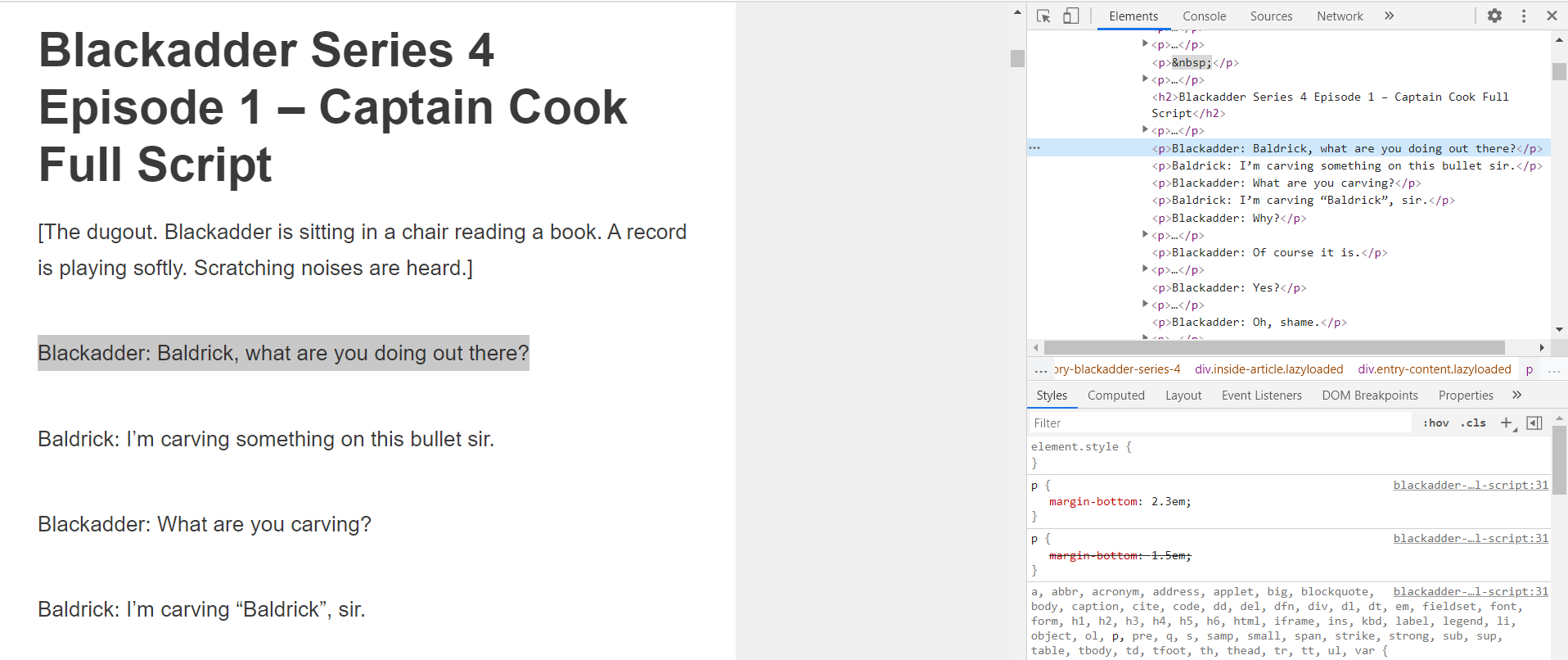
Look at the console in the picture above. The immediate parent of each <p> is a div with the class entry-content lazyloaded. We want the text inside those <p> tags. We express that in this format:
script = soup.select("div.entry-content p")
script
This returns the matching HTML, but it is neither clean nor pretty.
We are nearly there, but not done yet. There are images in the page content too. get_text() extracts only the text from the tags.
dialogues = []
for i in script:
    dialogues.append(i.get_text())

dialogues
And we assemble them together.
file1 = open("Season 4.txt", "a+")
for dialogue in dialogues:
    dialogue = dialogue.rstrip("\n")
    file1.write(dialogue)
    file1.write("\n")
file1.close()
That’s one episode done. We can do the same for the others too. Congratulations on the first dataset!
- The full notebook is on GitHub in case you want to play around with it.
- The dataset I created is on Kaggle.
Web Scraping: Part II
“When the going gets tough, the tough get going.”
The second website is a little trickier to work on. But we can get through this.
import requests
from bs4 import BeautifulSoup as bs

url = "https://www.amazon.in/Test-Exclusive-746/product-reviews/B07DJHXTLJ/ref=cm_cr_dp_d_show_all_btm?ie=UTF8&reviewerType=all_reviews"
page = requests.get(url)
soup = bs(page.content, "html.parser")
The end result should be something like this:
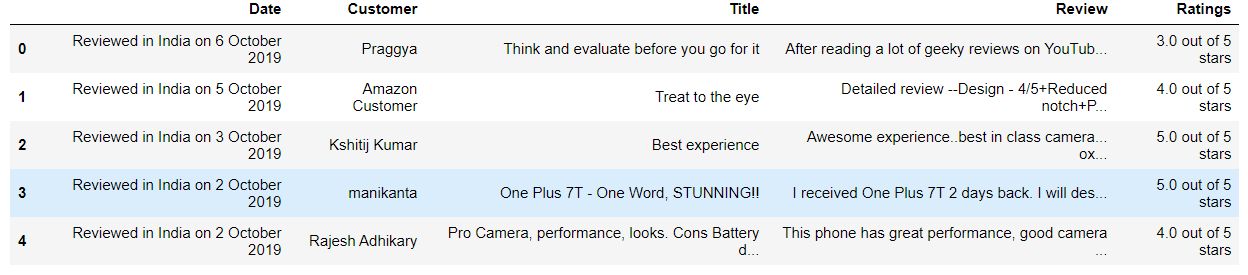
Give it some thought before moving on.
Now, let’s get the list of names first, shall we? Here is the slight change of syntax that will enable you to do so.
name = soup.select("div span.a-profile-name")
name
data = name[2:]
data
If you inspect the console again, you will find that the div enclosing the names has a child span with the class a-profile-name. The general idea is to find the parent tags and keep adding their children to the selector. But the data we get is hardly clean. The first entry is Amazon, the second is the name shown at the top of the page extract, and the third is a duplicate from the original content. So we need to drop them.
cust_name = []
for i in data:
    cust_name.append(i.get_text())

cust_name
And that should get the full list of customers who have left their reviews.
Similarly,
ratings = soup.select("div.a-row i.a-icon span.a-icon-alt")[3:]
ratings
data = []
for i in ratings:
    data.append(i.get_text())

title = soup.select("a.review-title span")
rev_title = []

for i in title:
    rev_title.append(i.get_text())

rev_title

date = soup.select("span.review-date")
rev_date = []

for i in date:
    rev_date.append(i.get_text())

content = soup.select("span.review-text-content span")
rev_content = []

for i in content:
    rev_content.append(i.get_text())
But wait: are all those lists the same length? Let it remain a puzzle as to what to do if they are not.
And finally:
import pandas as pd

df = pd.DataFrame()
df["Date"] = rev_date
df["Customer"] = cust_name
df["Title"] = rev_title
df["Review"] = rev_content
df["Ratings"] = data

df.to_csv("Reviews.csv")
That’s it. As a final exercise, run these lines and inspect their output:
html = list(soup.children)
soup.find("p")
p = soup.find_all("p")
Until the next post.